“I’m getting clicks… but not enough real enquiries.”
FREE Google Ads Audit

Why 7 out of Ads Leak Money Every Day...
f any of these feel familiar, your Google Ads account is likely leaking budget without you realising it.
- “I’m getting clicks… but not enough real enquiries.”
- “I don’t actually know which keywords are making me money.”
- “Google says things are ‘optimised’ — but my results say otherwise.”
- “My ad spend keeps going up, but my leads don’t.”
- “I’m not sure if people are clicking the ad… or my competitors.”
- “Some leads are good, others are a complete waste of time.”
- “I can’t tell if my ads are showing in the right locations.”
- “The reports look fine — but my bank balance disagrees.”
- “I’ve tried tweaking things, but I’m mostly guessing.”
- “I don’t know if my account is set up properly or just ‘good enough’.”
- “I’m worried my competitors are paying less per click than I am.”
👉 Book Your FREE Google Ads Audit
Find out
why your ads are leaking money — and what to fix first to get better leads without increasing spend.
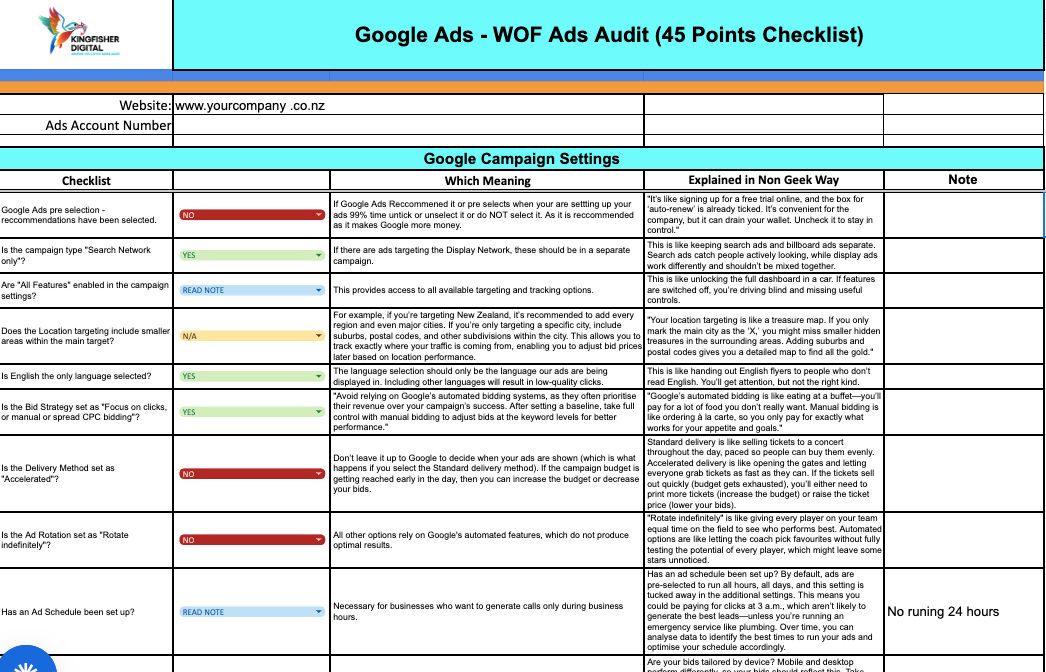
A FREE Google Ads Audit - WOF Test for your Ads (45 Point)
Instead of guessing, the audit shows you exactly where money is being made — and where it’s leaking.
We review the most common profit-killers inside Google Ads accounts and identify -
- What’s working and should be protected
- What’s broken and costing you money
- What’s missing and holding your results back
- Where the fastest, lowest-risk wins are
You’ll get clear answers, not vague advice
- Are your clicks turning into real enquiries?
- Is Google rewarding your account or penalising it?
- Are you paying for the right searches — or the wrong ones?
- Is Google optimising for real leads?
There’s no obligation, no pressure, and no guesswork — just clarity.
Even small fixes uncovered in this audit often pay for themselves many times over.
Independent Google Ads Advice, Not a Sales Pitch
Effective Google Ads management isn’t a “set and forget” task — it requires ongoing attention to keep campaigns aligned with what actually produces leads and sales.
At Kingfisher Digital, we manage Google Ads using a comprehensive, proven checklist that reviews critical performance factors every 3 days, 5 days, 30 days, and 90 days.
These regular checks help guide Google’s algorithm, correct drift early, and continuously refocus spend toward what’s delivering real results. When this level of management isn’t carried out, campaigns often go off target, costs creep up, and budget is quietly wasted.
Below are 12 key areas that are commonly overlooked by business owners and inexperienced freelancers — and they’re some of the biggest reasons Google Ads accounts leak money. This checklist has been honed over 19+ years of hands-on experience to consistently produce measurable results, not just activity.
Lets chat and get you questions answered
1.Landing Page
We assess whether your ads send traffic to a purpose-built sales landing page or a general website page, including message match, mobile speed, trust signals, and how clearly the page guides visitors to take action.
Which means…
You’ll see if your clicks are being turned into real enquiries or quietly wasted.
A poor landing page can kill conversions, inflate your costs, and drag down performance — while a strong one can deliver 2–6× more leads without increasing ad spend.
2.Ads Quality Score
We review your keyword-level Quality Scores and the three factors Google uses to calculate them - expected click-through rate, ad relevance, and landing page experience.
Which means…
You’ll know whether Google is rewarding your account with cheaper clicks — or penalising you by charging 3–5× more than competitors for the same traffic.
3.Google tag Tracking
We check that Google Tag, conversion tracking, and key events are firing correctly across forms, calls, buttons, and thank-you pages.
Which means…
You’ll know whether Google is optimising using real lead data — or guessing.
Broken tracking causes Google to make bad decisions, waste budget, and optimise for the wrong actions.
4.Negative Keywords
We review your negative keyword coverage using search term reports and account-level exclusions.
Which means…
You’ll uncover where budget is being lost on irrelevant searches that will never convert — often revealing instant savings without reducing lead volume.
5.CPC & Bidding Method
We analyse your bidding strategy (manual, enhanced, or automated) and your average cost per click relative to keyword intent and competition.
Which means…
You’ll see if you’re overpaying for low-value clicks or underbidding on high-intent searches — both of which can quietly cap results or burn budget faster than necessary.
6.Keyword Intent Types
We check whether your campaigns separate high-intent “ready to buy” keywords from research or early-stage searches.
Which means…
You’ll know if your budget is focused on people ready to enquire — or diluted across traffic that looks busy but rarely turns into customers.
7.Match Type Keywords
We review how Exact, Phrase, and Broad match keywords are being used and whether they’re structured with intent.
Which means…
You’ll see whether Google is showing your ads for searches you actually want — or triggering them for loosely related terms that drain budget and lower lead quality.
10.Ad Location Targeting
We review geographic targeting, exclusions, radius settings, and location intent options.
Which means…
You’ll see whether ads are showing outside your service area or to people you can’t help — one of the most common causes of wasted spend for local businesses.
11.Ads Campaign Goal Settings
We check campaign-level goals and how they align with your overall account objectives.
Which means…
You’ll know whether Google is optimising for leads and revenue — or chasing traffic that looks good in reports but doesn’t grow the business.
Some of Our Clients
"He Gives A Shit"
Phil Garrett
The Fixit Factory
"Worked To My Budget & Tripled Business"
Ricky Cooke
Garage Door Services & Garage Door Repairs
Lets chat and get you questions answered
Fashion Magazine
Blurred Lines